


The best video conference camera depends on who needs to be seen, how the room is arranged, and how the camera connects to the meeting computer. For a personal desk or a small group, an all-in-one USB webcam can simplify video and audio. For a conference room with participants seated farther from the camera, a motorized pan-tilt-zoom (PTZ) camera with optical zoom usually offers more framing flexibility. The right purchase is the camera that covers the required people and positions without creating unnecessary setup complexity.
This guide compares Tenveo cameras only, using published product specifications and practical meeting-room requirements. The recommendations are use-case selections, not independent laboratory test results or claims of superiority over the entire camera market. Camera and platform performance should be confirmed in the intended environment before purchase or deployment.
Best Video Conference Cameras: Quick Picks by Use Case
If you need a fast recommendation, start with the meeting format rather than the highest resolution printed on the box.
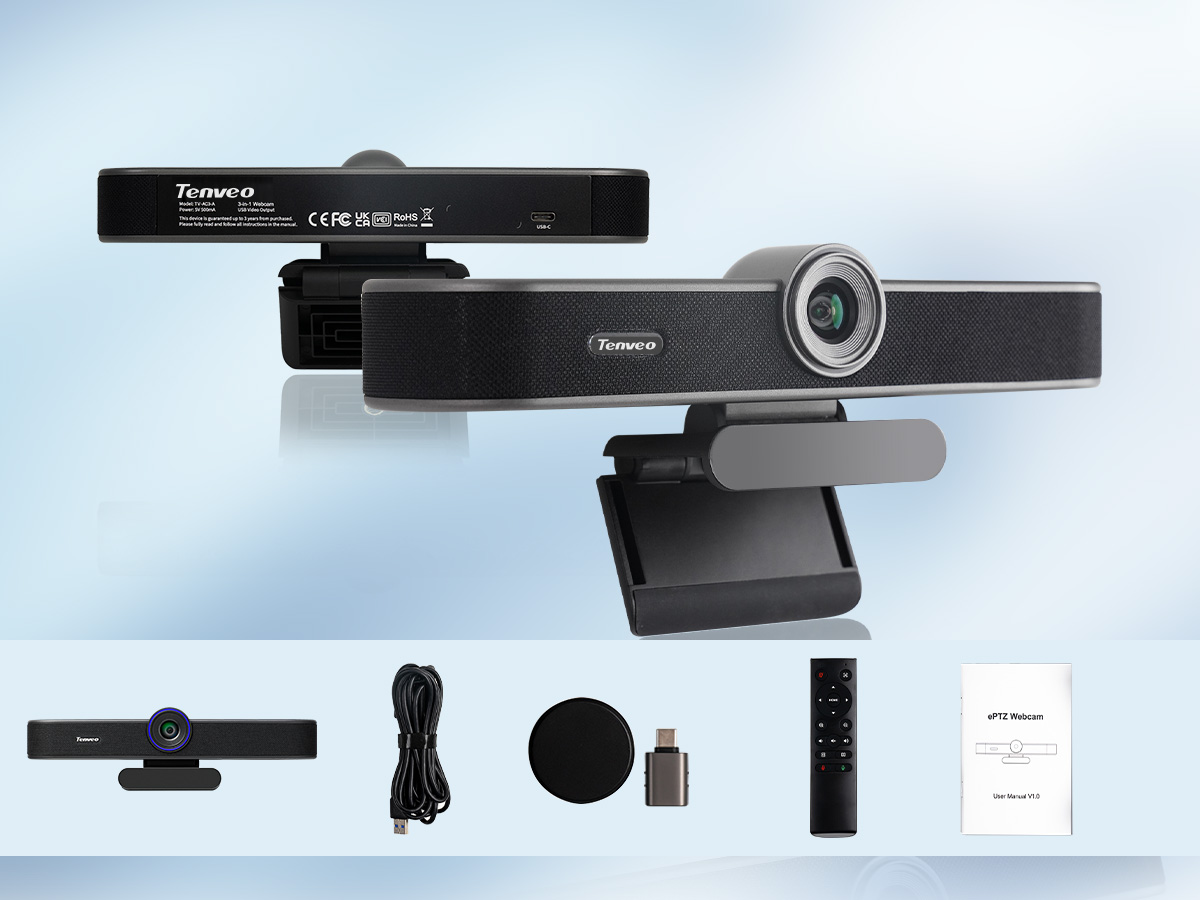
BEST FOR PERSONAL & SMALL-GROUP MEETINGS
Tenveo VA300C 4K 3-in-1 Webcam
4K/30 fps capture · 4x digital zoom · auto-framing · built-in microphones and speaker
Original VA300C model; see specifications before purchasing.

BEST FOR SMALL TO MEDIUM MEETING ROOMS
Tenveo VLoop 4K 12X PTZ Camera
12x optical zoom · motorized PTZ · USB 3.0 / HDMI · room-oriented framing
Confirm the selected configuration and plan room audio separately.

BEST FOR ZOOM-CERTIFIED WORKFLOWS
Tenveo VL20N 1080p 20X PTZ Camera
1080p/60 fps · 20x optical zoom · model-specific Zoom certification · USB / HDMI / IP
Confirm the exact VL20N certification/version and installation requirements.
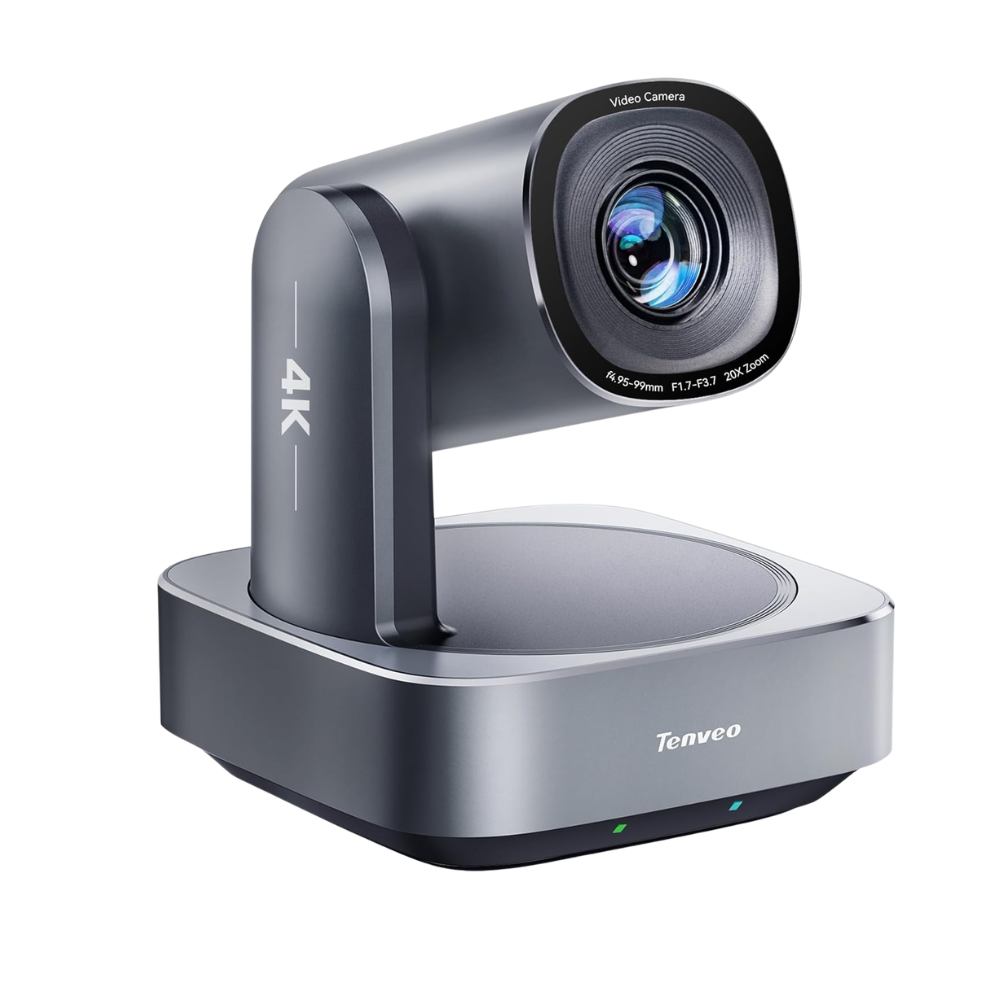
BEST FOR LARGER MEETING ROOMS
Tenveo VL20U 4K 20X PTZ Camera
4K/30 fps · 20x optical zoom · AI tracking · USB 3.0 / HDMI / LAN
Verify room coverage, exact model and available product listing before ordering.
| Meeting requirement | Tenveo camera to consider | Why it fits | Check before buying |
|---|---|---|---|
| Personal desk or small-group meeting | VA300C 4K 3-in-1 Webcam | USB video with built-in microphones and speaker; auto-framing and 4x digital zoom | Fixed-lens ePTZ rather than motorized optical PTZ; confirm the original VA300C model and current availability |
| Small to medium conference room | VLoop 4K 12X PTZ | Motorized positioning, 12x optical zoom, USB 3.0 and HDMI connections | External room audio may be needed; choose the correct product variant |
| Zoom-based conference workflow requiring certified camera hardware | VL20N 1080p 20X PTZ | Model-specific Zoom certification, 20x optical zoom and multiple output paths | Certification applies to VL20N only; confirm the exact version and connection |
| Larger or deeper meeting room | VL20U 4K 20X PTZ | 20x optical zoom, 4K-class imaging and PTZ movement for more distant subjects | Verify wide-end coverage, video output mode and separate room audio |
How these picks were selected: Each recommendation matches a stated meeting need to a published feature: integrated audio, optical reach, model-level certification or connection flexibility. “Best for” describes the role within this Tenveo-only shortlist; it does not represent a tested market ranking. For a procurement decision, measure the room, check the model's manual, and test the intended meeting application.
Which Type of Video Conference Camera Do You Need?
USB Webcams for Personal Video Meetings
A USB webcam is usually the most practical starting point for one person at a desk. It connects directly to the computer and appears as a camera source in compatible meeting software. A compact camera placed near the monitor also makes it easier for the presenter to face remote participants naturally.
All-in-One Conference Cameras for Small Groups
An all-in-one meeting camera combines video capture with some form of microphone and speaker capability. This can reduce the number of separate devices connected to a small meeting computer and simplify temporary room setups.
PTZ Cameras for Meeting Rooms and Boardrooms
A PTZ camera has a motorized mechanism that pans horizontally and tilts vertically; models with optical zoom also change focal length without relying solely on digital cropping. This is useful when the same room must show a wide table view, a presenter at the front, and a close-up of an individual speaker.
When a Camera Needs a Separate Microphone and Speaker
A camera's video capability and a meeting room's audio capability should be assessed independently. Many professional PTZ camera workflows use a separate speakerphone or room audio system rather than treating the camera as a complete conferencing appliance.
Best Tenveo Video Conference Cameras for Different Needs
Best for Personal Meetings: Tenveo VA300C 4K 3-in-1 Webcam
Best fit: Individual workstations, small group discussions and simple USB-based video meetings where integrated audio is preferred.
The Tenveo VA300C combines a fixed-lens 4K webcam, integrated microphones and a speaker. Tenveo's published product documentation lists up to 4K at 30 fps, an approximately 80-degree horizontal field of view, 4x digital zoom, USB-C connectivity and automatic group framing. The electronic pan/tilt/zoom function reframes the captured image; it does not provide the motorized lens movement or optical zoom of a conventional PTZ camera.
See Tenveo VA300C product specifications · Contact Tenveo about VA300C availability
Limitations: Digital zoom reduces the portion of the image used for framing and should not be equated with optical reach. Integrated audio is not necessarily sufficient for a long, acoustically difficult meeting room. For purchasing, confirm current VA300C availability through Tenveo. Do not confuse this model with other VA300C versions that have different hardware specifications.
Best for Small to Medium Meeting Rooms: Tenveo VLoop 4K 12X PTZ Camera
Best fit: Conference rooms where a fixed camera position must alternate between a table-wide view and closer participant framing.
The Tenveo VLoop 4K 12X PTZ Camera is listed with 12x optical zoom, 4K-class imaging, USB 3.0, HDMI and an RJ45 network connection with PoE support. The storefront presents selectable variants, including a version with additional network-video functionality; confirm the exact configuration rather than assuming every VLoop unit has the same features.
Limitations: A zoom lens cannot compensate for placing the camera where it cannot see the full meeting table. An independent microphone and speaker arrangement may be necessary, and HDMI by itself is not a direct selectable webcam input on a typical computer. Review the receiving system and camera variant before ordering.
Best for Zoom-Certified Workflows: Tenveo VL20N
Best fit: Organizations that need an explicitly identified, Zoom-certified camera model as part of their conferencing procurement criteria.
The Tenveo VL20N is the Tenveo model associated with Zoom certification in the brand's published materials. Its listed capabilities include 1080p at up to 60 fps, 20x optical zoom, AI auto-tracking and video output options covering USB, HDMI and IP-based workflows. Tenveo also lists PoE support for the model.
Limitations: Zoom certification applies to the VL20N model, not to all Tenveo products or an entire conferencing installation. Certification does not remove the need to confirm firmware, the meeting computer, audio devices or the chosen connection path. The camera is a 1080p model; buyers requiring a 4K camera output should evaluate a different Tenveo model. See Tenveo VL20N product specifications and browse the Tenveo PTZ camera range for current purchase options.
Best for Larger Meeting Rooms: Tenveo VL20U 4K 20X PTZ Camera
Best fit: Deeper meeting rooms, boardrooms and presentation spaces where the camera must show a participant or presenter at a meaningful distance.
The Tenveo VL20U is listed with 4K at up to 30 fps, 20x optical zoom, AI auto-tracking, USB 3.0, HDMI and LAN connectivity with PoE. These capabilities can help with flexible framing from an installation point away from the conference table.
Limitations: “Larger room” is not a fixed seating-capacity guarantee. The required field of view depends on camera placement, table width and the closest participant, while usable close-up detail depends on distance and lighting. Confirm actual output formats, power requirements and audio routing before deployment. See Tenveo PTZ Cameras for current purchase options.
Tenveo Video Conference Camera Comparison Chart
The following comparison describes published camera capabilities, not head-to-head results from controlled image-quality or acoustic testing.
| Feature | VA300C | VLoop 4K 12X | VL20N | VL20U |
|---|---|---|---|---|
| Camera type | All-in-one USB webcam with electronic framing | Motorized PTZ | Motorized PTZ | Motorized PTZ |
| Listed maximum camera video | 4K/30 fps | 4K/30 fps | 1080p/60 fps | 4K/30 fps |
| Zoom | 4x digital | 12x optical | 20x optical | 20x optical |
| Framing or tracking | Auto-framing | PTZ; variant-dependent AI features | AI auto-tracking | AI auto-tracking |
| Connections | USB-C | USB 3.0, HDMI, RJ45 | USB, HDMI, IP | USB 3.0, HDMI, LAN |
| Integrated microphones / speaker | Yes / yes | Do not assume; plan external audio | Do not assume; plan external audio | Do not assume; plan external audio |
| Primary use case | Desk / compact meeting | Small-medium room | Certified Zoom workflow | Deeper room / boardroom |
| Main buying check | 4x digital rather than optical zoom; model availability | Correct variant and audio plan | Exact certified model and workflow | Wide-angle coverage and audio plan |
Specifications are based on Tenveo-published product material reviewed for this article. Maximum camera-output specifications are not promises of transmitted meeting resolution. Products, bundles and firmware may vary; confirm the current product page and manual before purchasing.
How to Choose the Best Camera for Video Meetings
Resolution: Is 1080p Enough, or Do You Need 4K?
For ordinary video meetings, 1080p can provide sufficient facial detail when framing, focus, lighting and transmission quality are appropriate. A 4K-capable camera can offer more pixels for capture and potential cropping flexibility, but a meeting application may deliver a lower resolution based on platform limits, participant settings and available bandwidth.
Field of View and Room Coverage
Field of view determines how much of the room the camera captures at its current focal length. A wider starting view helps include people sitting close to the camera or around a short, wide table. A narrower view can make distant speakers appear larger, but may exclude participants at the edges.
Optical Zoom vs. Digital Zoom
Optical zoom changes lens focal length to magnify distant subjects. Digital zoom enlarges a cropped portion of the captured image. Both can affect framing, but they do not offer identical detail retention when magnifying a faraway speaker.
AI Auto-Framing vs. Presenter Tracking
Auto-framing generally adjusts the view to keep a person or group appropriately positioned in the picture. Presenter tracking seeks to follow a moving subject, typically using camera movement on a supported PTZ device. Exact behavior, tracking modes and the ability to switch subjects depend on the product and its configuration.
Microphone, Speaker, and Audio Quality
Remote participants need clear speech at least as much as sharp video. Test whether quiet speakers can be heard from the far seats and whether the speakerphone creates echo when remote participants talk. Hard walls, glass and long tables can change the result significantly.
USB, HDMI, and IP Connectivity
USB is usually the simplest route for selecting a camera in a desktop meeting application. HDMI carries video to a compatible display, recorder or capture device; it normally requires a video capture interface before it can appear as a computer camera. IP enables network-based video or control, but receiving software and protocol compatibility must be confirmed.
Video Conferencing Platform Compatibility
Many conference cameras can supply a standard USB video source to applications such as Zoom or Microsoft Teams, subject to the operating system, firmware and app configuration. Different platforms may limit transmitted resolution, frame rate or remote camera control.
How to Choose a Conference Camera by Room Size
Room labels are useful starting points, but distance, seating geometry and camera position are better selection criteria than a generic capacity claim.
Personal Desks and Huddle Spaces
A desk or compact huddle area usually benefits from minimal setup. Position the camera near eye level, use a field of view that includes the intended participants, and avoid having a bright window directly behind the subjects. A Tenveo VA300C is a candidate when its USB and integrated-audio design matches the room.
Small Conference Rooms
A small conference room can often be covered from the end of the table or a wall-mounted position. If the group must alternate between a wide shot and a closer view of an active speaker, a VLoop 4K 12X PTZ is worth evaluating. Check both the widest available shot and the closest framing needed before fixing the mounting point.
Medium Conference Rooms
In a medium room, the nearest participant may sit very close to the camera while the presenter stands much farther away. This creates two competing needs: a wide field of view and enough optical reach for a close-up. The VLoop may be suitable where its field of view and 12x zoom cover the planned shots; the VL20N or VL20U may be more appropriate when longer optical reach is needed.
Large Conference Rooms and Boardrooms
For a long boardroom or a presentation area positioned far from the camera, evaluate a motorized PTZ model such as the VL20U. Map the camera's view of both the nearest and farthest seats before choosing the installation location. A high zoom number alone does not guarantee room coverage.
How to Set Up a Video Conference Camera
A reliable meeting setup should be verified end to end: camera position, video connection, audio devices, application selection and an actual call test.
Step 1 — Choose the Right Camera Position
Place a personal webcam near eye level. For a PTZ camera, choose a secure indoor mounting position that supports both the wide room shot and the closest presenter view. Confirm that tables, monitors and people do not block the lens. Tenveo PTZ cameras are intended primarily for indoor use and should not be treated as weatherproof outdoor security cameras.
Step 2 — Connect the Camera to Your Computer or AV System
For a USB workflow, connect the camera to a compatible computer port using the specified cable. If a PTZ camera feeds an HDMI-based production system, connect it to a supported capture or switching input before expecting the video to appear in computer meeting software. For an IP workflow, check the camera's network settings and the receiving system's supported protocol.
Where the selected camera uses PoE, verify switch power capacity and the model's electrical requirements. A network cable alone is not sufficient if the receiving application cannot access the video stream.
Step 3 — Set Up Your Microphone and Speaker
For the VA300C, select its integrated microphone and speaker if they meet the room's needs. For a PTZ installation, connect a suitable room audio device such as a Tenveo MagiCallPro and select it explicitly in the computer's sound settings. Keep microphones away from loudspeakers when possible and test echo control.
Step 4 — Configure the Camera in Your Meeting Application
Open the application's video settings and select the actual camera or capture device. Choose the intended microphone and audio output separately. Check whether the selected USB or capture path offers the desired picture format. Set PTZ presets or tracking options in the supported control interface, not by assuming every meeting application exposes those controls.
Step 5 — Test Framing, Audio, and Video Before the Meeting
Start a real test call. View the picture from the remote participant's perspective, walk through intended speaking positions, and test audio from every occupied seat. Check backlighting, remote sound, PTZ movement and whether people remain in view. For a shared conference room, document the camera and audio settings so later meetings do not begin with guesswork.
Common Mistakes When Buying a Video Conference Camera
Mistake: Assuming a 4K camera always produces a 4K meeting. Camera capture specifications and remote transmission quality are different. Check the meeting application's actual supported output and test-call result.
Mistake: Selecting zoom before checking the wide shot. The most distant speaker matters, but so does the person nearest the camera. Measure the room and check coverage at both ends of the lens range.
Mistake: Confusing digital zoom with optical zoom. Digital crops can be useful for desk framing, whereas optical zoom better preserves detail when capturing distant subjects. Compare the type of zoom, not just its multiplier.
Mistake: Treating auto-framing and moving-subject tracking as identical. Group framing and presenter following solve different problems. Verify the behavior offered by the exact camera model.
Mistake: Ignoring the meeting room's audio path. A sharp image cannot compensate for distant or echoing speech. Include the speakerphone, acoustics and computer audio selection in the purchase decision.
Mistake: Assuming every output connector works the same way. USB video, HDMI and network video may require different receivers or configuration. Draw a simple signal path before ordering.
Mistake: Assuming one certified model means an entire product range is certified. Confirm the specific model and certification scope. Tenveo identifies VL20N as Zoom certified; that statement should not be generalized to other Tenveo cameras.
Frequently Asked Questions About Video Conference Cameras
What is the best camera for video meetings?
The best camera for video meetings matches the seating layout and connection requirements. A compact all-in-one USB webcam may be sufficient for personal meetings, whereas a room with distant participants may benefit from an optical-zoom PTZ camera. Within the Tenveo range reviewed here, consider VA300C for a desk, VLoop for a smaller conference room, VL20N for a Zoom-certified workflow and VL20U for greater optical reach.
What is the difference between a webcam and a conference camera?
A webcam usually serves an individual computer and may include a fixed lens and integrated audio. A conference camera is selected to cover multiple participants or a larger space and may offer motorized PTZ movement, optical zoom or connections to room AV equipment. The terms overlap, so the physical room and system requirements are more reliable buying criteria than the product label alone.
Is a 4K webcam better than a 1080p PTZ camera?
Not necessarily. A 4K webcam can provide more capture detail at a short distance, but a 1080p PTZ camera with optical zoom may frame a distant speaker more effectively. Meeting platforms can also reduce transmitted resolution. Compare viewing distance, field of view, audio requirements and output compatibility before favoring a resolution number.
Do I need a PTZ camera for a conference room?
Not for every conference room. A small meeting space with a fixed group can work well with an appropriate all-in-one USB camera. PTZ becomes more useful when the room needs to alternate between wide and close-up shots, follow a presenter or capture people seated farther from the lens. Test the required camera angles before deciding.
Can I use a conference camera with Zoom or Microsoft Teams?
Many conference cameras can work with Zoom or Microsoft Teams through a supported USB video or capture-device workflow. Compatibility depends on the camera's output mode, computer, software version and configuration; IP video may need additional receiving equipment or software. Tenveo identifies VL20N specifically as Zoom certified. Always verify the exact installed model and workflow.
Do conference cameras have built-in microphones and speakers?
Some do, but many professional PTZ cameras are designed primarily to capture video. The Tenveo VA300C integrates a microphone and speaker, while a PTZ-based conference setup should be planned with a suitable separate room audio device unless the exact camera documentation states otherwise. Match audio pickup to the table and room acoustics, then check the complete system in a test call.
Find the Right Tenveo Camera for Your Meeting Space
A good video conferencing camera is the one that makes every intended participant visible and works reliably with the room's audio and meeting software. For a simple desk setup, consider an integrated USB webcam. For a meeting room with changing camera angles or distant speakers, prioritize optical zoom, suitable wide-angle coverage, dependable connections and properly planned sound pickup.
Explore Tenveo PTZ Cameras or review Tenveo's room-size solutions to match the camera to your layout. If the project includes multiple camera angles or dedicated room audio, the Tenveo corporate office solutions can help frame the wider system requirements. Confirm current availability, model specifications and the intended conferencing workflow before purchasing.


